Asking questions
Start an Analytics chat, use the prompt chips, and ask questions that Meelu can answer well.
Every question lives in a chat. A chat is one running conversation about your site. You ask, Meelu answers, and you can ask a follow-up in the same chat. Meelu remembers what you talked about earlier in that chat.
Start a chat
Open the Analytics desk
Open the Meelu desktop app and click Analytics in the sidebar. A new chat opens with the title New analysis.
Ask your question
Type your question in the box that says Ask about this website's data… and press Enter, or click the send arrow. You can also click one of the prompt chips under the intro text.
Wait for the answer
While Meelu works, you see Meelu is analysing and short lines that show each step it takes. The answer then appears in the chat. Most answers take a short while, because Meelu runs a real analysis on your data.
Ask a follow-up or save it
Ask the next question in the same chat, or click Save as report under the answer to keep it. See Reports.
Your first message becomes the chat's title. The chat then shows up in the sidebar under Analytics, so you can come back to it later.
Prompt chips
A new, empty chat shows prompt chips. A prompt chip is a ready-made question you can send with one click:
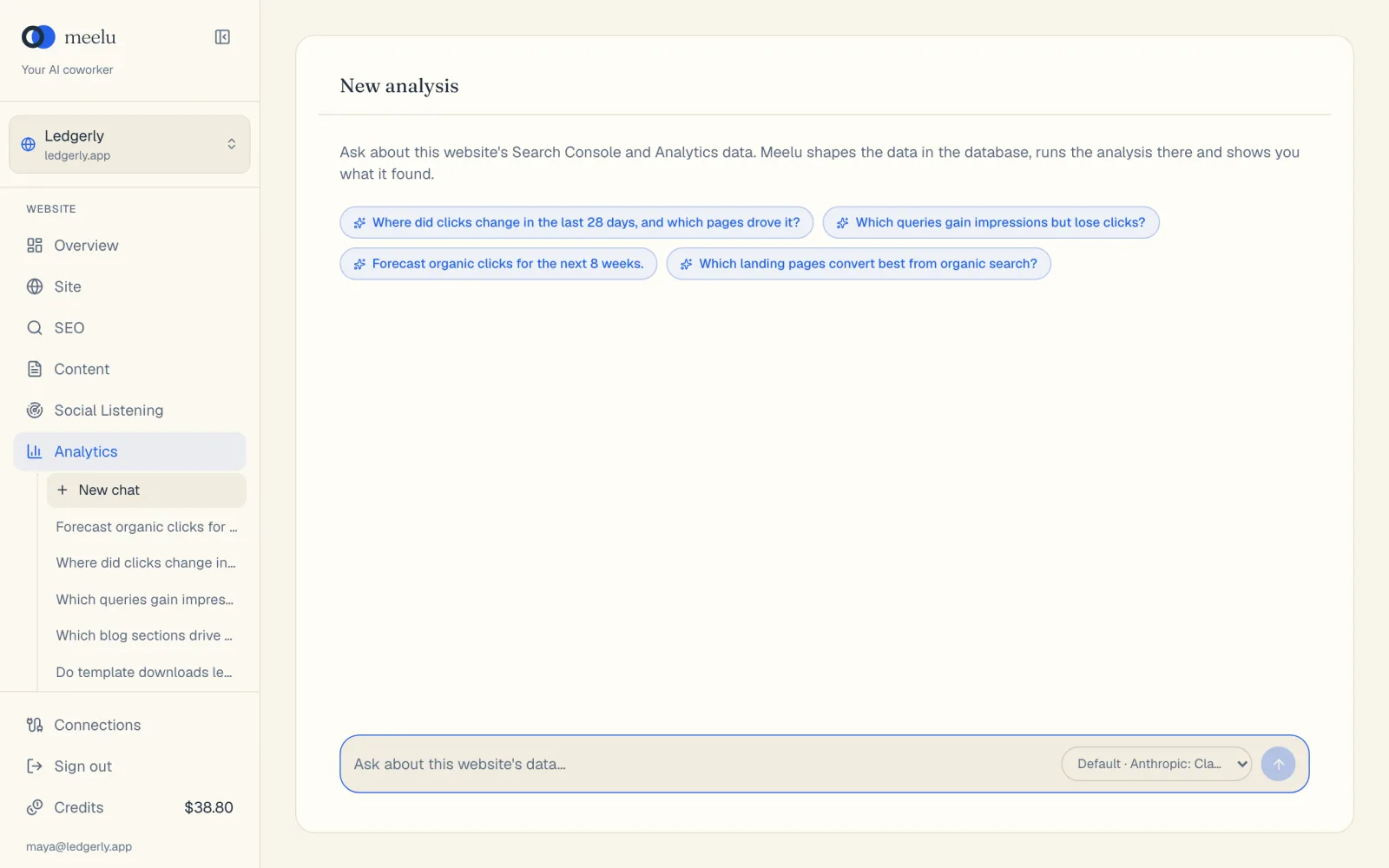
- 1New chat starts a fresh analysis
- 2Prompt chips: questions ready to run
- 3Type your own question
- 4Pick the AI model
- Where did clicks change in the last 28 days, and which pages drove it?
- Which queries gain impressions but lose clicks?
- Forecast organic clicks for the next 8 weeks.
- Which landing pages convert best from organic search?
The chips only show at the start of a new chat. Once you send a message, you type your own questions.
What each button does
| Button | What it does |
|---|---|
| New chat (sidebar) | Starts a fresh, empty chat. Only in the desktop app. |
| A chat title (sidebar) | Opens that past chat with its messages. |
| Show more (sidebar) | Loads older chats into the sidebar list. |
| A prompt chip | Sends that ready-made question as your first message. |
| Send arrow | Sends what you typed. Enter does the same. Shift+Enter adds a new line. |
| Stop (square button) | Shows while Meelu works. Stops the current answer. |
| Model picker | Picks which AI model answers. See Models. |
| Show earlier messages | Shows at the top of a long chat. Loads older messages. |
| Save as report | Shows under Meelu's latest answer. Asks Meelu to save that answer as a report. |
When Meelu asks for permission
Reading your data never needs your permission. Saving something does. When you click Save as report, Meelu asks before it saves. A box appears in the chat that says what Meelu wants to do.
| Button | What it does |
|---|---|
| Allow | Lets Meelu do this one action. |
| Always allow this action | Lets Meelu do this kind of action without asking again, until you quit the app. |
| Full access | Lets Meelu do any of its allowed actions without asking, until you quit the app. |
| No | Declines. Meelu does not save, tells you what it was going to do and stops. |
Ask good questions
Meelu gives the best answers when your question is specific. A good question says:
- What you want to know. "Which pages lost clicks" is clearer than "how is my site doing".
- The time range. "In the last 28 days" or "since March".
- What to compare. "Compared with the 28 days before" or "mobile versus desktop".
Here are some questions that work well:
- Which pages lost the most clicks this month compared with last month?
- Which queries rank between position 5 and 15 and get a lot of impressions?
- Was there a day when organic clicks suddenly changed? Which pages moved?
- Which traffic channels bring visitors who sign up?
- Do pages with audit issues get fewer clicks than pages without them?
- How do mobile and desktop visitors differ on the pricing page?
- What will organic clicks look like over the next 8 weeks?
Follow up in the same chat
If an answer raises a new question, ask it in the same chat. Meelu keeps the context, so you can say "now split that by country" without starting over.
Continue a past chat
Click a chat title in the sidebar to open it. In the desktop app, you can keep asking questions in it. On the web, you can read the chat, and the page says Open Meelu on your computer to continue this chat.