SEO desk
Find what to target next in search, see what Google already sends you, and track search demand for the keywords you care about.
The SEO desk answers one practical question: what should this website try to rank for next, and how likely is it to work?
It brings together three kinds of evidence:
- What Google already sends you, measured by Google Search Console.
- What visitors do once they arrive, measured by Google Analytics.
- What the wider search market looks like: how many people search a phrase, who ranks for it today, and how strong those pages are.
Meelu reads this evidence, points at the best openings and explains why. You decide what to write, change or leave alone. The desk never edits your site.
The screens
SEO home
Keyword clusters by search demand, plus a summary of every other screen.
Search performance
Clicks, impressions, CTR and position from Search Console.
Indexation
Which of your pages Google actually holds in its index.
Traffic
Sessions, channels, landing pages and key events from Google Analytics.
Keyword clusters
Groups of searches one page can win, and who searches them.
Tracked keywords
Your rank and monthly search demand over twelve months.
Competitors
The domains that chase the same searchers as you.
Backlink opportunities
Sites that link to your competitors but not to you.
Cannibalization
Searches your own pages split, and pages that read almost the same.
SEO suggestions
Fixes Meelu found, with the evidence. Approve, reject or mark them done.
Asking the SEO desk
Task cards, saved prompts and the questions Meelu answers best.
The SEO home screen
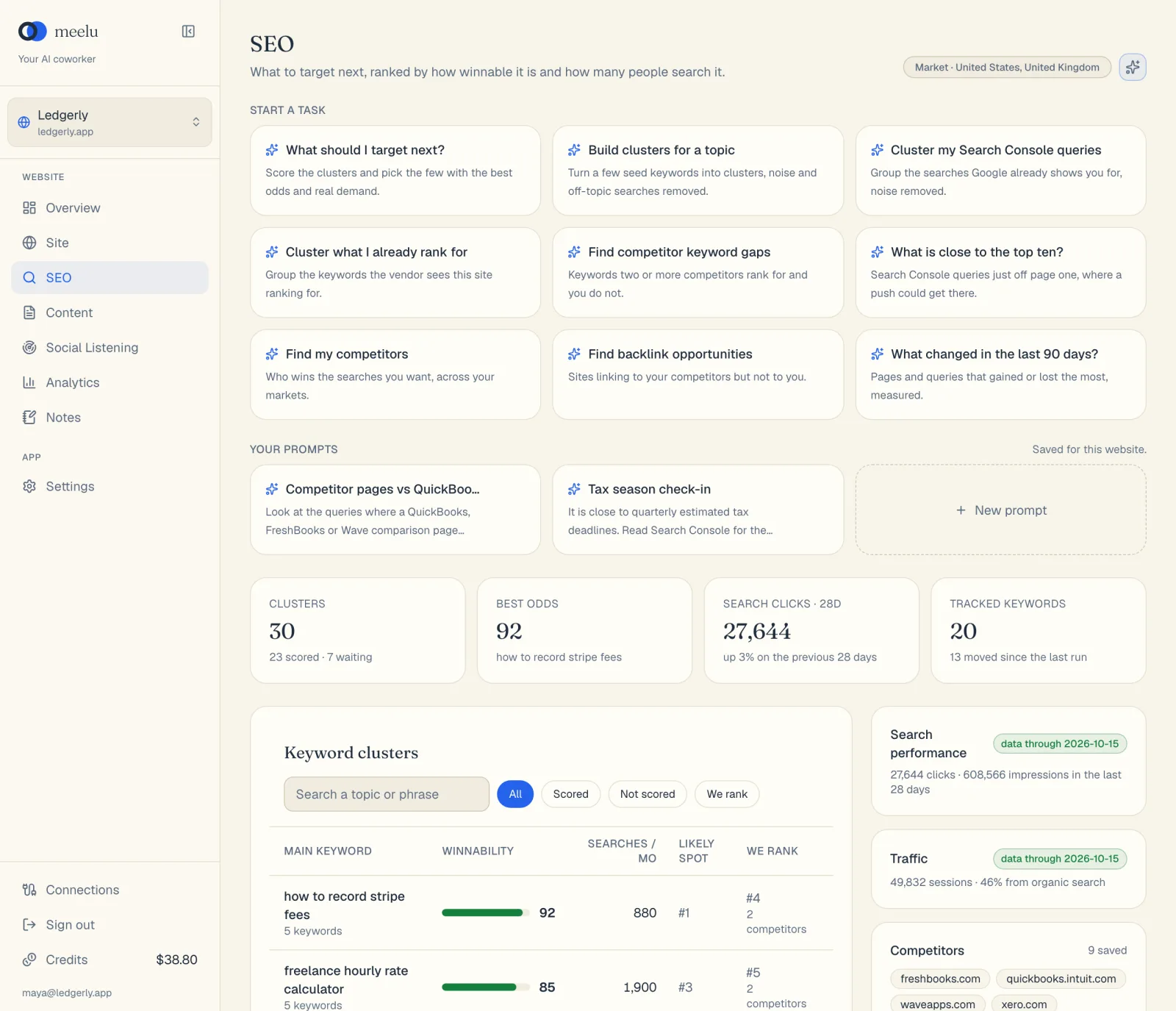
Open SEO in the sidebar. The top of the screen shows your Market badge. This is the country or countries the desk researches. It comes from the Markets and Language fields on your website record. If you leave Markets blank and your language is English, the desk uses English-speaking searchers worldwide. If your site sells in another language, set the markets yourself, or the desk shows Market not set.
- 1Ask Meelu
- 2Plan a page for a cluster
- 3Save a prompt of your own
Below the header you see four summary cards:
| Card | What it shows |
|---|---|
| Clusters | How many keyword clusters you have, and how many of them you already rank for. |
| Biggest cluster | The monthly searches of your most searched cluster. Click it to open that cluster. |
| Search clicks · 28d | Clicks from Google in the last 28 days, and the change from the 28 days before. Click it to open Search performance. |
| Tracked keywords | How many keywords you track, and how many moved in Search Console position since last month. Click it to open Tracked keywords. |
The main part of the screen is the Keyword clusters table. It is explained in full on Keyword clusters.
On the right, five cards link to the other screens:
- Search performance shows a badge: syncing, data through a date, or not synced.
- Traffic shows your sessions and the share that came from organic search.
- Competitors shows how many competitors you saved, with the first few names and their domain rank.
- Backlink opportunities shows how many genuine sites link to your competitors but not to you.
- Cannibalization shows how many searches more than one of your pages shows for.
Above the cluster table, a Suggestions link shows how many SEO suggestions are open.
What each button does
| Button | What it does |
|---|---|
| Ask Meelu (sparkle icon, top right) | Opens a task with Meelu about clusters, search performance, competitors or tracked keywords. Desktop app only. |
| Task cards under Start a task | Start a ready-made task with one click. See Asking the SEO desk. Desktop app only. |
| New prompt under Your prompts | Save your own prompt as a card for this website. Desktop app only. |
| All, We rank, We don't rank | Filter the cluster table. |
| Plan a page (on a cluster row) | Asks Meelu to write a page brief for that cluster. Desktop app only. |
SEO words, in plain English
Credits
Reading your own Search Console and Analytics data costs nothing. Actions that need fresh market data use credits. These include building and scoring clusters, tracking search demand, adding competitors and fetching their backlinks. Tasks you run with Meelu also use credits. See Credits.
Meelu suggests, you decide
Every task on this desk ends with a recommendation and the evidence behind it. Meelu does not publish, rewrite, redirect or delete anything. When it wants to save something, such as a list of competitors, it shows you the list first and saves only what you agree with. See Suggestions.