AI models
Choose which AI model runs your tasks, set a default, or run tasks on your own Anthropic key.
Meelu's agent runs on a large language model, an AI model that reads and writes text. You choose which one. Different models trade off cost, speed and quality, and Meelu shows you the price of each before you pick.
You pay what the model costs, from your credits, with no markup. Or you can use your own Anthropic key and pay Anthropic directly.
Three places to choose a model
| Where | What it sets |
|---|---|
| Default model card on Connections | The model every new task uses, unless you pick another. |
| Model menu in the task panel | The model for the task you are about to start. |
| Your Anthropic key card on Connections | Runs tasks on your own key, with its own default model. |
Set your default model
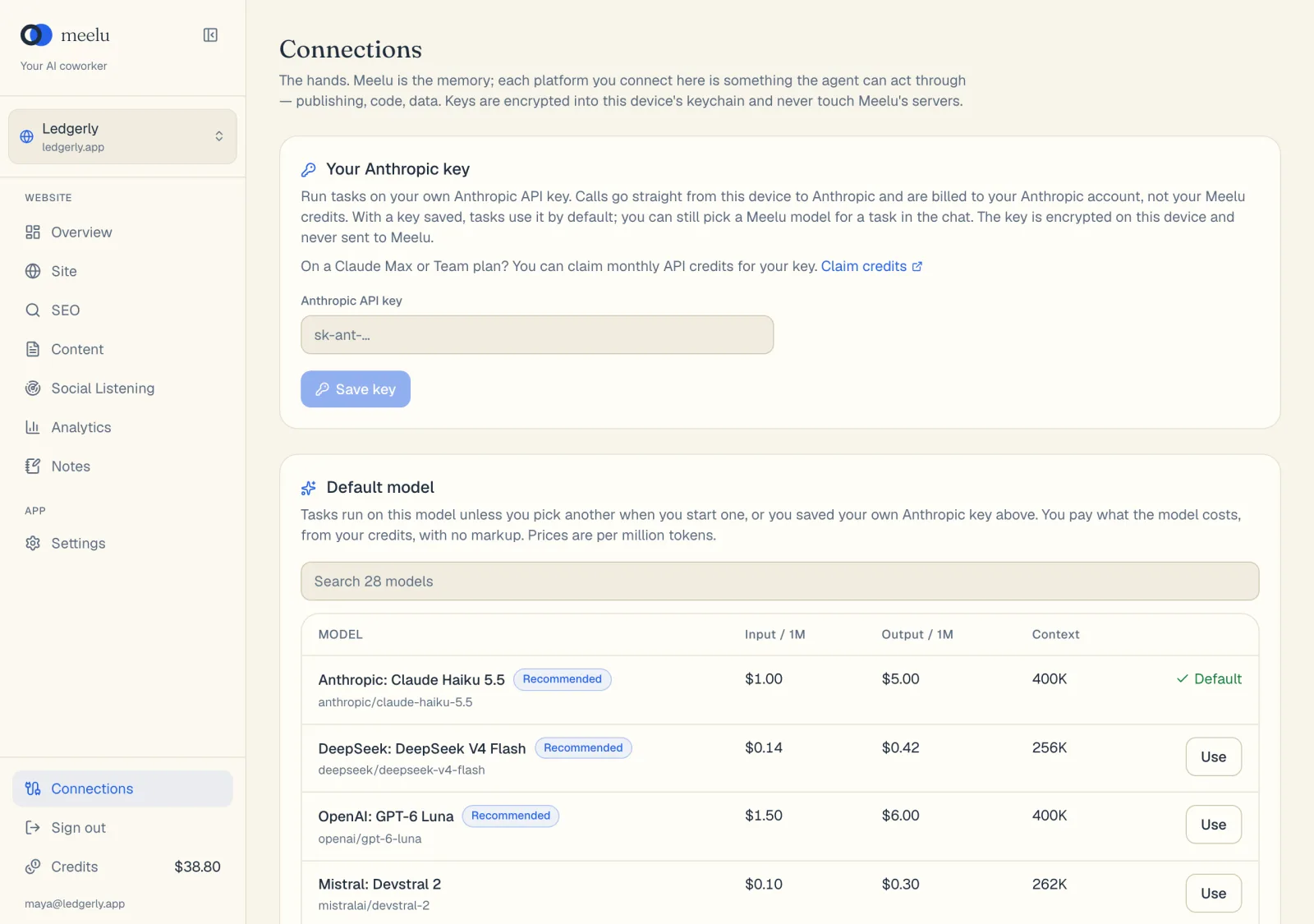
Open Connections
Click Connections near the bottom of the sidebar. Scroll to the Default model card.
Compare the models
Each row shows the model's name, its price for Input / 1M and Output / 1M (per million tokens), and its Context. Models marked Recommended are a good place to start.
Click Use
Click Use on the model you want. The row then says Default.
Reading the price columns
A token is a small piece of text, about three quarters of a word. Models charge per million tokens.
- Input / 1M is the price for what Meelu sends the model: your message, plus the pages and data it reads to answer.
- Output / 1M is the price for what the model writes back.
- Context is how much text the model can hold at once. A bigger context lets Meelu read more in one go.
Most of a task's cost is usually input, because Meelu reads a lot to give a grounded answer. Click a column heading to sort by it.
Pick a model for one task
In the task panel, next to the send button, there is a small model menu. It starts on Default, followed by your default model's name. Open it to pick another model for the task you are about to start. The menu groups models under Recommended, Well-known providers and Other models, and shows each one's input and output price.
The model a task uses is fixed when the task starts. To try a different model, start a new task.
When to switch models
Use a cheaper model for simple lookups, like "list my broken pages". Use a stronger model for planning and writing, like "plan a page for this cluster", where quality matters more than cost.
Use your own Anthropic key
If you have an Anthropic account, Meelu can run tasks on your own API key. Model calls then go straight from your computer to Anthropic and are billed to your Anthropic account, not your Meelu credits.
Create a key
Sign in to the Anthropic Console, open Settings, then API keys, and create a new key. Add a payment method or credits to your Anthropic account.
Open the Your Anthropic key card
In Meelu, click Connections. The card is at the top.
Save it
Paste the key into Anthropic API key and click Save key. Meelu checks the key with Anthropic before saving it. When it works, you see Saved, applies to the next task.
Pick a default model for your key
A Default model menu appears on the card. Choose which Claude model your tasks use.
From then on, new tasks use your key by default. You can still pick a Meelu model for a single task from the model menu in the task panel. That task is charged to your credits. Your own key's models appear in that menu under Your Anthropic key.
Good to know:
- The key is encrypted on your computer and never sent to Meelu.
- Keyword data, web searches and page classification still use credits, because they run on Meelu's servers.
- On a Claude Max or Team plan, you may be able to claim monthly API credits for your key. The card has a Claim credits link that explains how.
What each button does
| Button | Where | What it does |
|---|---|---|
| Use | Default model card | Makes that model your default for new tasks. |
| Search models | Default model card | Filters the list by name. |
| Column headings | Default model card | Sorts by input price, output price or context size. Click again to reverse, and a third time to clear. |
| Show all (number) models / Show fewer | Default model card | Shows the full list, or only the first 12 rows. |
| Model menu | Task panel | Picks the model for the task you are about to start. |
| Save key | Your Anthropic key card | Checks and saves your Anthropic key. |
| Remove key | Your Anthropic key card | Deletes your key from this computer. Tasks go back to your Meelu default model. |
| Default model menu | Your Anthropic key card | Picks which Claude model runs on your key. |
| Claim credits | Your Anthropic key card | Opens Anthropic's help page about monthly API credits. |