Site desk
What the Site desk does, the screens inside it, and how it feeds the other desks.
The Site desk is where Meelu reads your website and tells you what it found. It answers three questions:
- What do my pages say? Every page Meelu has read, and the text inside it.
- How are my pages connected? Which pages link to which, and which pages are hard to reach.
- What is technically wrong? Problems that stop search engines and AI tools from reading your site well.
Everything on this desk starts with a crawl. A crawl is when Meelu visits your site and reads its pages, the same way a search engine does. Until you crawl, the desk has nothing to show.
Meelu suggests, you decide
The Site desk never changes your website. It reads your pages, points at what it found and explains why it matters. You make any change on your site yourself, in your own website editor.
The screens in the Site desk
Open Site in the sidebar. The main screen gives you a summary. From there you open three more screens.
Crawling
Read your site, follow the progress, and keep it fresh.
The website record
Your domain, markets, language, sitemaps and the summary of your business.
Pages
Every page Meelu has read. Search what they say and filter them.
A single page
Everything Meelu knows about one page.
Internal links
Internal link suggestions and pillar page suggestions.
Technical SEO
Checks on the raw HTML and on the page as a browser shows it.
Asking the Site desk
Ask Meelu questions about your site, with ready-made prompts.
The main Site screen
At the top you see the title Site, your domain, how many pages are on record and when the site was last crawled.
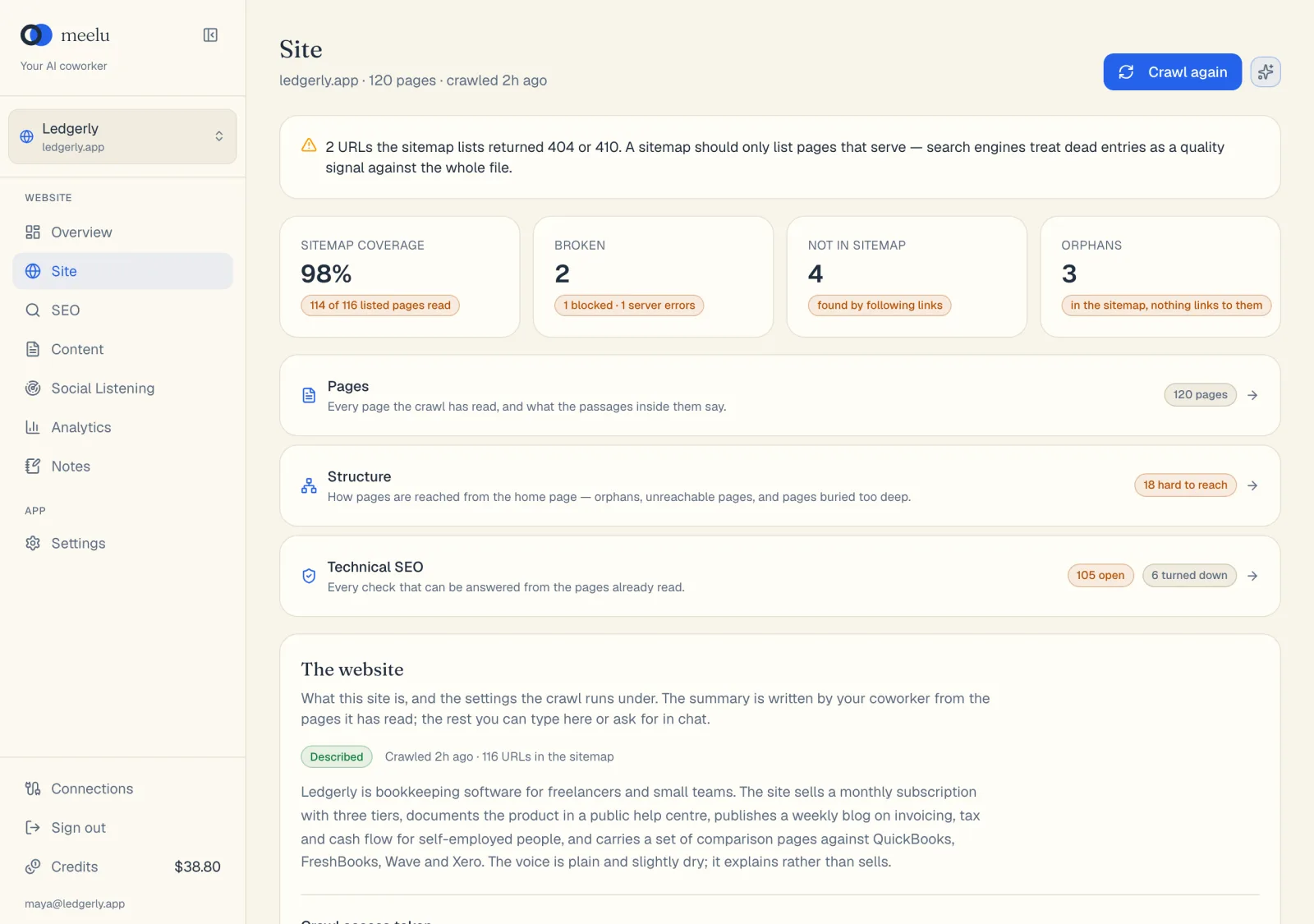
- 1Crawl again reads the whole site again
- 2Ask Meelu opens ready-made questions for this desk
- 3Pages lists every page the crawl read
- 4Internal links shows link and pillar page suggestions
- 5Technical SEO lists technical problems
The six numbers
After the first crawl, six cards sum up the health of your site. Click a card with pages behind it to see the list.
| Card | What it tells you |
|---|---|
| Sitemap coverage | How many of the pages your sitemap lists Meelu could read. A sitemap is a file on your site that lists the pages you want search engines to find. Below 100% means some listed pages did not load. |
| Broken | Pages that returned "not found" (404) or "gone" (410). The hint below the number also counts pages that blocked Meelu, had a server error or did not answer. |
| Not in sitemap | Pages Meelu found by following links, but your sitemap does not list. Either add them to the sitemap or decide they should not be in search. |
| Orphans | Pages no other page on your site links to. Visitors and search engines struggle to find them. |
| Unreachable | Pages linked only from pages that the home page cannot reach. You cannot get to them by clicking from the home page. |
| 4+ clicks deep | Pages four or more clicks from the home page. Link to them from a page nearer the top, such as a hub page or your menu. |
The numbers update every time a crawl ends. If the crawl did not find a home page at the root of your site, a warning appears: Meelu cannot measure click depth, so every linked page shows as unreachable.
If your sitemap lists pages that no longer exist, a yellow warning appears above the cards. Search engines see dead entries in a sitemap as a sign of a poorly kept site, so it is worth cleaning up.
The three sections
Below the numbers are three cards. Click one to open that screen.
| Section | What you find there | Badge |
|---|---|---|
| Pages | Every page the crawl has read, and the passages inside them. | How many pages are on record. |
| Internal links | Suggested internal links and pillar pages. | None. |
| Technical SEO | Every check Meelu can answer from the pages it has read. | How many checks are open, and how many you turned down. |
At the bottom of the screen is The website card. See The website record.
What each button does
| Button | What it does |
|---|---|
| Crawl website | Reads your site for the first time. Shows as Crawl again after the first crawl. Works in the Meelu desktop app only. |
| Stop crawl | Shows while a crawl runs. Stops it and keeps the pages already read. |
| Ask Meelu (sparkle icon) | Opens a chat with Meelu about this site. Desktop app only. See Asking the Site desk. |
| Use this sitemap | Shows only when no sitemap was found. Paste your sitemap's address and Meelu crawls with it and remembers it. |
How the Site desk relates to other desks
The Site desk is the base the other desks build on. A desk is one area of Meelu with its own screens and its own job. See Desks.
- SEO desk. The Site desk knows what your pages say. The SEO desk knows how Google sees them, from your Search Console and Analytics data. Some Site desk ideas, such as pillar pages for shared search queries, use that data too.
- Content desk. When Meelu writes a new page for you, it reads what the Site desk knows to pick the internal links for that page.
- Analytics desk. Counting, averaging and comparing across many pages is the Analytics desk's job. When you ask a question like "which section has the most thin pages?", Meelu can bring in that desk.