Content desk
Write and check web pages for your own website, grounded in your site and search data, then publish them yourself.
The Content desk is where you write new pages for your own website. Each page you write here is called a piece. Meelu helps you write it, checks it, and keeps it safe as a draft. You copy the finished piece and put it on your site yourself.
The Content desk writes web pages only. It does not write social posts, emails or ads.
What a piece is made of
Every piece has six parts. These are the same parts any web page has.
| Part | What it is |
|---|---|
| Title | The page title that search engines show as the blue link in results. It is also the text on the browser tab. Keep it under about 60 characters. |
| H1 | The main headline people see at the top of the page. It can be different from the title. |
| Meta description | The short summary that search engines often show under the title in results. It reads best at 70 to 160 characters. |
| Slug | The last part of the page's web address, for example /blog/how-to-send-an-invoice. |
| Target keyword | The one search query this page is written to rank for, for example "how to send an invoice". |
| Body | The text of the page itself: paragraphs, headings, lists, links and images. |
What Meelu does, and what you do
Meelu helps you write the page and tells you what could be better. You decide what goes on your site.
- Meelu suggests a target keyword from your search data, suggests internal links to pages that already exist on your site, drafts the text, and checks it.
- You read it, change what you want, and keep or discard every change the agent proposes.
- You publish it. Meelu never publishes a piece on its own and does not track where a piece went. If you linked Webflow, you can ask it to publish the page live there. See Publishing by hand.
Agent features need the desktop app
You can write, edit and delete pieces on the web and in the desktop app. Writing with the agent, rewriting with the agent and running the checks work only in the Meelu desktop app.
The Content screen
Click Content in the sidebar. You see a list of every piece for the current website.
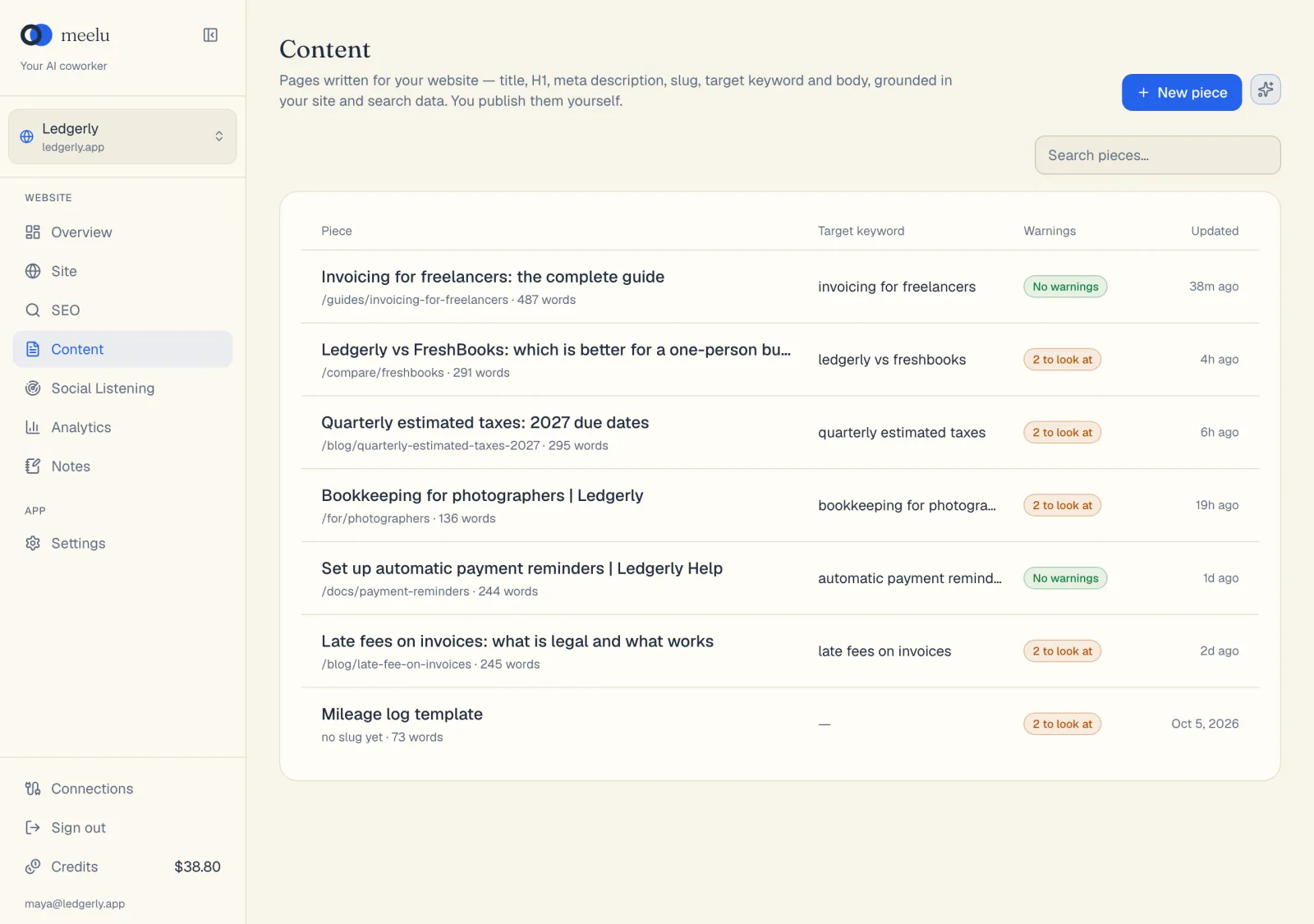
- 1New piece starts a page with the writer
The list has four columns:
- Piece: the title, with the slug and the word count under it. If the piece has no slug yet, it says no slug yet.
- Target keyword: the keyword the piece is written for, or a dash if it has none.
- Warnings: No warnings in green, or a count such as 2 to look at. These are the page warnings Meelu checks on every save. See Checks.
- Updated: when the piece last changed.
Click any row to open the piece in the editor.
If you have no pieces yet, the screen says Nothing here and asks you to start a piece.
What each button does
| Button | What it does |
|---|---|
| New piece | Makes an empty piece called "Untitled piece" and opens it in the editor. You write it yourself, or open the agent from the editor. |
| Write with the agent (the sparkle icon) | Opens a task where you tell the agent what the page is about. It researches your site, proposes a keyword and links, drafts the page, and saves it only when you say so. Desktop app only. |
| Search pieces… | Filters the list as you type. |
In this section
Create a page
Start a blank piece or have the agent write one from your site and search data.
The editor
Page fields, the toolbar, autosave and how agent changes are reviewed.
Checks
The warnings on every save and the deeper checks you run in the app.
Publishing by hand
Copy a finished piece and put it on your website.