Checks
What Meelu checks on every save, what the deeper checks in the app look for, and how to act on each result.
Meelu checks your pieces in two ways.
- Page warnings run every time a piece is saved, on the web and in the app. They look at the page fields.
- The Checks panel runs deeper checks on the text when you ask. These run on your own computer, in the Meelu desktop app.
Both only point things out. Nothing is changed until you or the agent change it, and you review every change the agent makes.
Page warnings
Meelu runs these every time a piece is saved. You see the count in the Warnings column on the Content screen, such as 2 to look at, and the full list under Page warnings in the editor's Details panel.
| Warning | What it means |
|---|---|
| Title too long | The title is longer than about 60 characters. Search results cut longer titles. |
| No H1 | The page has no headline. |
| No meta description | The page has no meta description. |
| Meta description length | The meta description is shorter than 70 or longer than 160 characters. |
| H1 in the body | The body has its own level 1 heading. The page's H1 is its own field, so start the body's headings at level 2. |
| Keyword missing | The target keyword does not appear in the title, the H1, the meta description or the first paragraph. The warning names which ones. |
A piece with none of these shows No warnings. The warnings go away on their own once you fix the problem and the piece saves.
The Checks panel
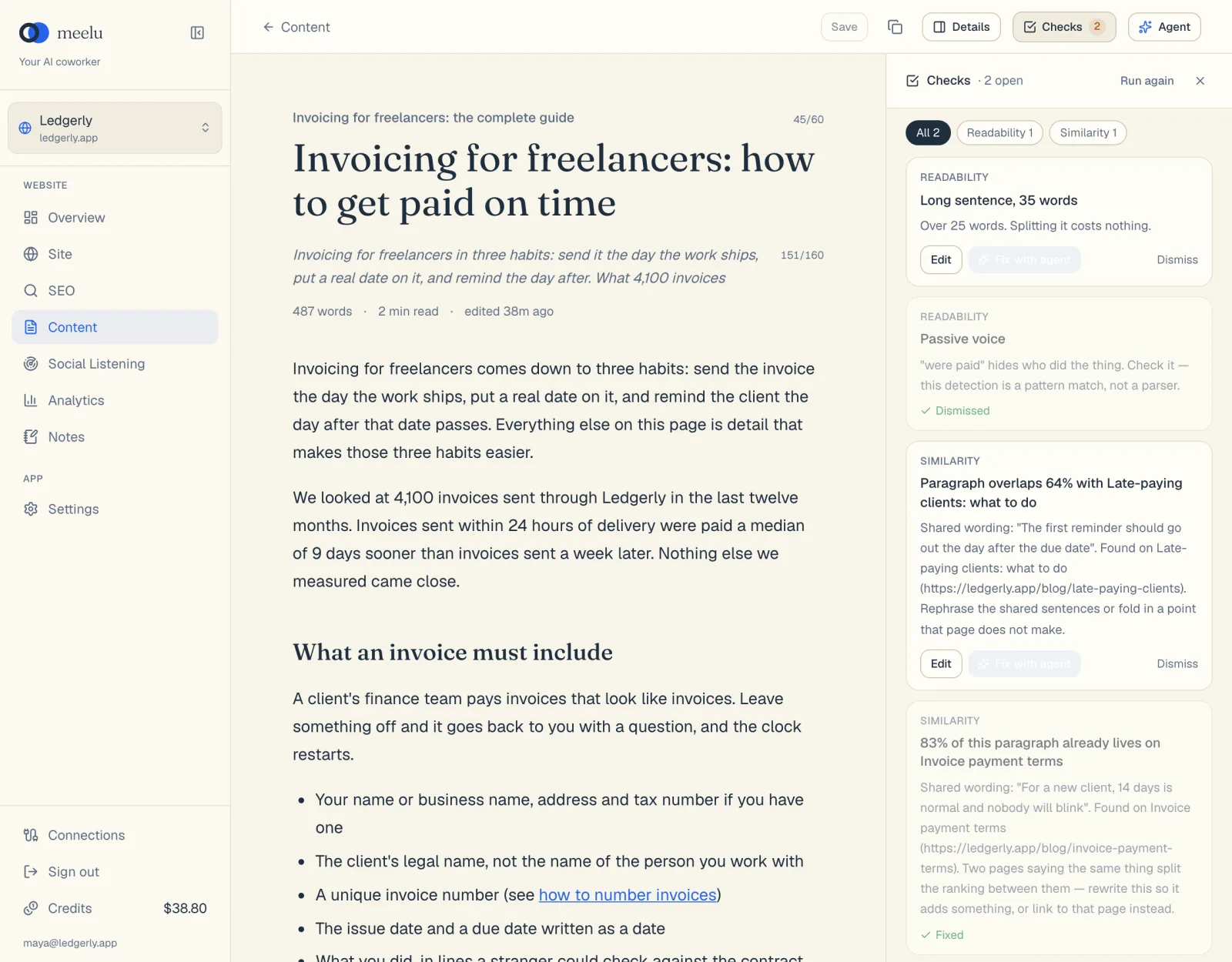
Click Checks in the editor's top bar to open the panel. The first time, click Run checks. After that, the button reads Run again. Meelu saves the piece first, then checks the saved text.
Desktop app only
The checks run on your computer. On the web, the panel says to open the piece in the Meelu app to run them. Results from an earlier run in the app still show on the web.
The first time you run the checks, the AI detector downloads a model of about 150 MB to your computer. Later runs use the copy you already have.
The four checks
| Check | What it looks for |
|---|---|
| Readability | Sentences that run too long, passive voice, and sentences with many long words. It can also add general tips on how readable the text is. |
| Similarity | Wording already on your site. It compares the whole piece with every crawled page, and names a page when the piece is very similar to it (over 60%), with the longest shared passage. It also compares each paragraph with your crawled pages and names the page and the shared words. A close match is marked as a duplicate. |
| AI detector | Text that reads as machine-written. It gives an overall result and flags the passages that score highest. It is right about four times in five, so read flagged text yourself before you change it. |
| Page rules | Common problems on a web page: no level 2 or 3 headings on a long page, no links to other pages on your site, a very long paragraph, an opening rhetorical question, phrases that sound machine-written (such as "delve" or "game-changer"), and advertising phrases (such as "act now" or "world-class"). |
The headings and internal links rules apply only to pieces of 300 words or more.
Reading a result
Each result is a card. It shows:
- the check that found it, such as Readability,
- a short title, such as Long sentence, 34 words,
- a line that explains why it matters,
- a suggested replacement in green, when the check has one.
Click a card to jump to the passage in the body. Meelu highlights it.
When there are results from more than one check, chips at the top filter the list: All and one chip per check, each with its count.
What each button does
| Button | What it does |
|---|---|
| Run checks / Run again | Saves the piece and runs all four checks. Each new run replaces the earlier results of the same check. |
| Close (the X) | Closes the panel. |
| Edit | Jumps to the passage and selects it, so you can fix it yourself. Shows when the result points at a passage. |
| Fix with agent | Asks the agent to fix this one passage. The fix arrives as a proposed change you keep or discard. Desktop app only. |
| Dismiss | Marks the result as not worth fixing. It stays in the list, faded, marked Dismissed. |
| Done | Shows instead of Dismiss when the result is about the whole piece, not one passage. Click it once you have dealt with it. It is then marked Fixed. |
To fix every open result in one go, open Agent and click Fix all N flagged issues. See The editor.
Meelu suggests, you decide
A check result is a pointer, not an order. Some flagged sentences are fine as they are. A long sentence can be the clearest way to say something, and the AI detector can be wrong about your own writing. Fix what you agree with and dismiss the rest.