A single page
Everything Meelu knows about one page, from its link score to how it looks in Google.
Click any row in the Pages table to open that page's detail view. It brings together everything the crawl read about one page, so you can judge it in one place.
The top of the screen
You see the page title, a badge with its kind, and the page address. Click the address to open the live page in a new tab. A grey badge means the crawl skipped the page as legal, pagination, thin or a redirect.
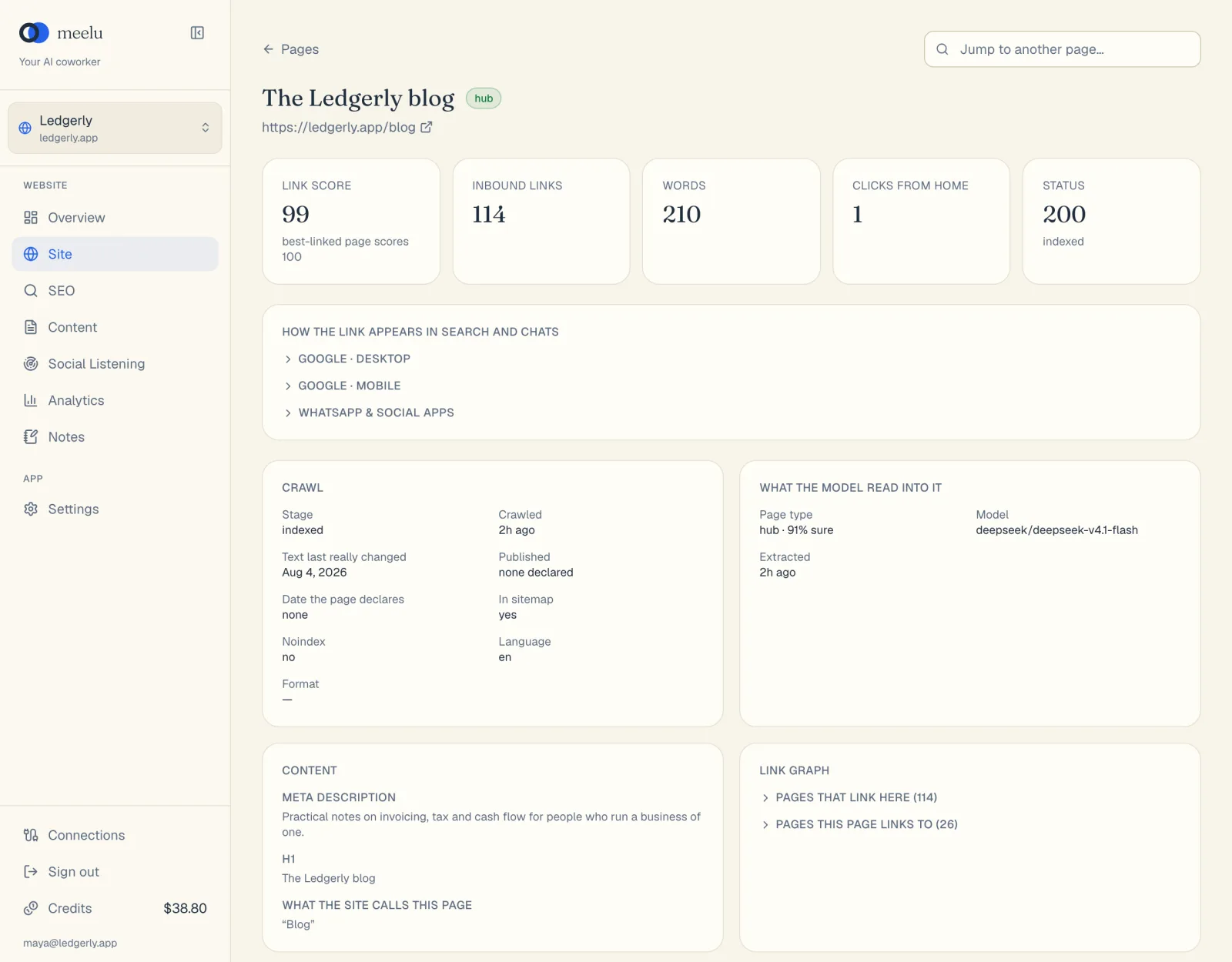
To move to another page without going back, use Jump to another page… at the top right. Type part of a title, or an address path that starts with /, and pick a page from the list.
The five numbers
| Card | What it tells you |
|---|---|
| Link score | How well linked the page is inside your site. Your best-linked page scores 100. A low score on an important page means it needs more internal links. |
| Inbound links | How many links from your other pages point here. |
| Words | How much text the page has. |
| Clicks from home | How many clicks it takes to reach this page from your home page. Four or more is usually too deep. |
| Status | The answer your server gave, such as 200 for OK. Below it is the crawl stage. |
An internal link is a link from one page on your site to another page on your site. Internal links help visitors move around and help search engines find and rank your pages.
How the link appears in search and chats
This section shows a preview of how your page looks when someone sees a link to it. Click a heading to open each preview:
- Google · desktop: your page as a Google result on a computer.
- Google · mobile: your page as a Google result on a phone.
- WhatsApp & social apps: the card that shows when someone shares your link.
Meelu also warns you about common problems here. For example, a title too wide for Google's desktop results, a missing meta description, or missing Open Graph tags. Open Graph tags are the hidden fields that WhatsApp, Slack and social apps use to build the link card. Without them, people see a bare link.
Crawl
This card shows what the crawl found.
| Field | Meaning |
|---|---|
| Stage | Where the page is in Meelu's reading. See below. |
| Crawled | When Meelu last read the page. |
| Text last really changed | When the page text last changed between crawls. Meelu needs two crawls to measure this. |
| Published | The publish date the page declares, if any. |
| Date the page declares | The "last updated" date the page claims, if any. |
| In sitemap | Whether your sitemap lists this page. |
| Noindex | Whether the page tells search engines not to show it. |
| Language | The language the page declares. |
| Format | For articles: how-to, listicle, comparison or case study. |
Below the fields you may see extra notes:
- Canonical points elsewhere: the page says another address is its main copy. Search engines will usually show that other address instead. If that is not what you want, fix the canonical on your site.
- Redirects to: the page sends visitors to another address.
- Fetch error: why the page could not be loaded.
Crawl stage
| Stage | Meaning |
|---|---|
| pending | Not fetched yet. |
| blocked | Your robots.txt does not allow it to be read. |
| failed | Your site returned an error. |
| skipped | Read, but not worth studying (legal, pagination, thin or redirect). |
| crawled | Fetched, but not searchable in Meelu yet. |
| indexed | Searchable in Meelu. You can find its text from the Pages search. |
Indexed here means in Meelu
indexed in this screen means Meelu can search the page. It does not say whether Google has indexed it. For how Google sees your pages, use the SEO desk.
What the model read into it
After a crawl, an AI model reads each page and decides its kind. This card shows:
- Page type: the kind it picked, and how sure it was, such as "money · 92% sure".
- Model: the AI model that made the call.
- Extracted: when it did this.
If the card says Not classified yet, wait a little after the crawl ends. It happens on its own.
Content
- Meta description: the short summary search engines may show under your title.
- H1: the main heading on the page.
- What the site calls this page: the link text other pages use when they link here. If this text does not match what the page is about, search engines get mixed signals.
Link graph
Three lists show how this page connects to others. Click a heading to open its list. Each address opens in a new tab.
- Pages that link here: your pages that link to this one.
- Pages this page links to: your pages this one links to.
- Other sites this page links to: links to other websites.
If no internal links touch the page at all, you see No internal links touch this page. That page is an orphan. See Structure for how to fix it.
What each button does
| Button | What it does |
|---|---|
| Pages (back link) | Returns to the Pages table. |
| Jump to another page… | Searches your pages by title or path and opens the one you pick. |
| Page address | Opens the live page in a new tab. |
| Preview headings | Open or close each search and social preview. |
| Link graph headings | Open or close each list of links. |