The website record
The settings and summary Meelu keeps for your site, and how each field changes what Meelu does.
The website card sits at the bottom of the main Site screen. It holds what Meelu knows about your site as a business, and the settings the crawl runs under. Meelu reads this record before it works on your site, so keeping it right makes every answer better.
The summary
At the top of the card is a short description of what your business is. Meelu writes it from your home page, in the background, while the desktop app is open. If Markets is blank, Meelu may fill it in at the same time. A badge shows its state:
| Badge | Meaning |
|---|---|
| Described | The summary is written. It shows below the badge. |
| Writing it up… | Meelu is reading your home page and writing the summary now. |
| Not described yet | There is no summary yet. |
Next to the badge you see when the site was last crawled and how many addresses your sitemap lists.
If there is no summary yet, click Write it now. If writing failed, the button says Try again.
To get a fuller, page-backed write-up, ask the Site desk with the Build site profile prompt. Meelu reads your home, product, pricing and about pages and says what the site covers well, what it covers thinly and what it never mentions. It saves the summary only after you agree to it. See Asking the Site desk.
Crawl access token
This section shows only in the desktop app.
The crawl reads your site from your computer. A firewall or bot protection service may see that as a bot and block it. The crawl access token is a secret code made on your computer that never leaves it. Every request the crawl sends carries it in a header named X-Meelu-Crawl.
To let the crawl through, tell your firewall to allow requests with that header. On Cloudflare, add a WAF custom rule that matches the header and skips the remaining custom rules and Bot Fight Mode.
| Button | What it does |
|---|---|
| Reveal / Hide | Shows or hides the token. |
| Copy | Copies the token, so you can paste it into your firewall rule. |
The fields
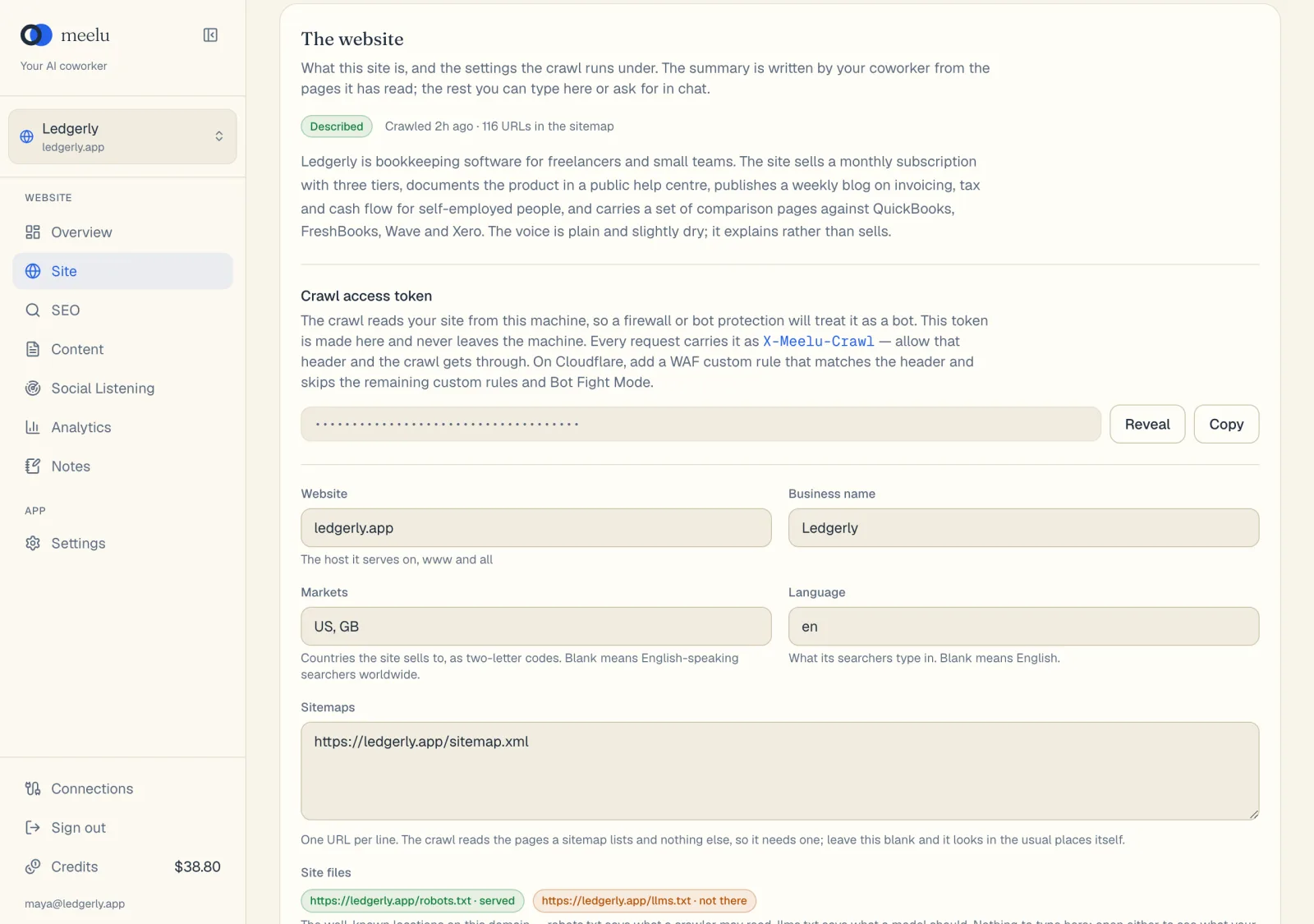
| Field | What to enter | Why it matters |
|---|---|---|
| Website | The host your site serves on, with www if you use it. For example www.yourproduct.com. | This is the site Meelu crawls. |
| Business name | Your business or brand name. | Meelu uses it when it talks about your site. |
| Markets | The countries you sell to, as two-letter codes, such as US, GB, CA. | Leave blank to mean English-speaking searchers worldwide. |
| Language | The language your searchers type in, such as en. | Leave blank to mean English. |
| Sitemaps | One sitemap address per line. | The crawl reads the pages a sitemap lists, so it needs one. Leave blank and Meelu looks in the usual places. |
| Site files | Nothing to type. | Shows whether your site serves robots.txt and llms.txt. Click either to open it. |
| Code repository | The address of your website's code project, such as a GitHub link. | When a problem comes from a shared template, Meelu can point at the template instead of every page that shows it. Meelu never stores a token for it. |
Site files badges
robots.txt tells crawlers which pages they may read. llms.txt is a newer file that tells AI tools what your site is about. Each shows a badge:
| Badge | Meaning |
|---|---|
| served | The file is there and loads. |
| not there | The file does not exist on your site. |
| HTTP and a number | The file returned an error. |
| not looked for yet | No crawl has checked it yet. |
What each button does
| Button | What it does |
|---|---|
| Write it now | Asks Meelu to write the summary from your home page now. Desktop app only. |
| Try again | Retries the summary after it failed. |
| Reveal / Hide | Shows or hides the crawl access token. |
| Copy | Copies the crawl access token. |
| Save | Saves your changes to the fields. It is greyed out until you change something. |