Notes
Write something down once, and Meelu reads it before every task on that website.
Notes are the things you have told Meelu once, so you never have to say them twice. Meelu reads them before every task. A note outranks whatever Meelu was about to do.
Notes belong to one website. A note you write for one site does not apply to your other sites.
Open the Notes desk from the sidebar, under Website.
Two kinds of note
| Kind | What it is for | Example |
|---|---|---|
| Rule | How you want things done. | "Never open a page with a rhetorical question." |
| Correction | Something Meelu got wrong once, so it does not happen again. | "We do not sell to agencies. Stop suggesting agency keywords." |
Both kinds work the same way. The label just helps you keep track of why each note exists.
What makes a good note
A good test: is it still true next month? If yes, it is worth a note.
Good notes are:
- specific: "Our product is only sold in the UK and Ireland" beats "focus on our market"
- short: one idea per note, so you can edit or delete it on its own
- in your words: Meelu follows them as written
Do not use notes for one-off instructions. "Make this draft shorter" belongs in the task. "Keep blog intros under 60 words" belongs in a note.
Write a note
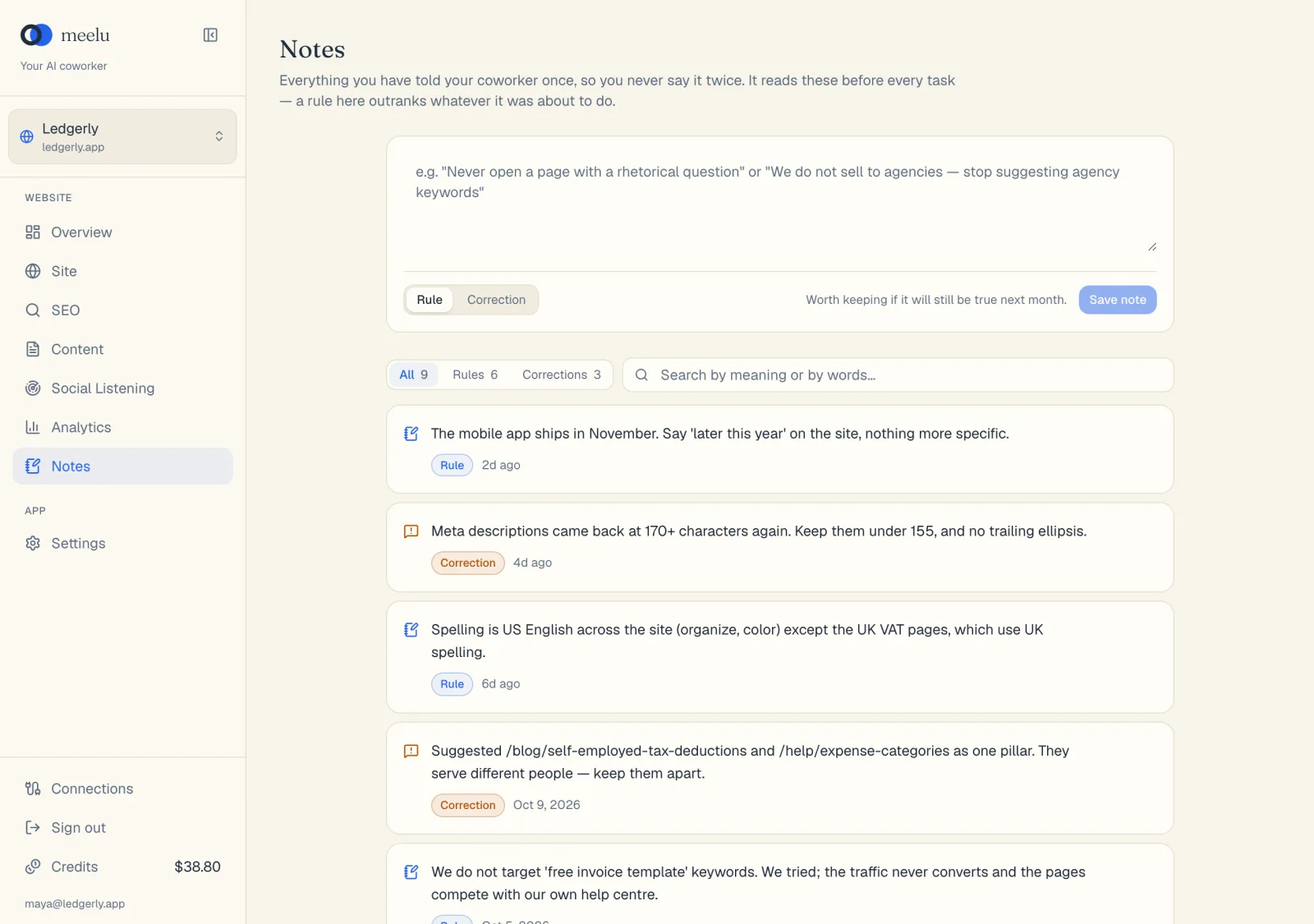
Type it
Type the note in the box at the top of the Notes desk.
Pick the kind
Choose Rule or Correction below the box.
Save it
Click Save note. It applies from the next task you start.
Meelu can also offer to save a note during a task, for example right after you correct it. It always asks first, and saves your wording.
Find, edit and delete notes
- Use the All, Rules and Corrections filters to narrow the list. Each shows a count.
- Use the search box to find a note by its meaning or its words. For example, searching "pricing" can find a note that says "never mention what we charge".
- Hover over a note to see the edit and delete buttons.
What each button does
| Button | What it does |
|---|---|
| Rule / Correction | Sets the kind for the note you are writing or editing. |
| Save note | Saves a new note. |
| All / Rules / Corrections | Shows all notes, or only one kind. |
| Search box | Finds notes by meaning or by words. Press Enter to search. |
| Clear search (X) | Clears the search and shows every note again. |
| Edit note (pencil) | Opens the note so you can change its text or kind. |
| Save | Saves your edit. |
| Cancel | Closes the edit without saving. |
| Delete note (bin) | Deletes the note. Meelu asks you to confirm. This cannot be undone. |
Notes and your profile are different
Notes are about one website and how to work on it. Your profile, in Settings, is about you: your name, your sign-off and your voice. It is shared across all your websites. See Your profile.