Credits and billing
How Meelu charges, what is free, the free trial, topping up and what happens when credits run out.
Meelu has one plan, and it runs on credits. One credit is one US dollar. There is no subscription, no tier and no seat count. You pay a small daily fee for each website, plus the outside services Meelu uses for you, at the price they charge.
Your balance is always at the bottom of the sidebar, next to Credits.
What costs credits
| What | Price |
|---|---|
| Each website, for your first five websites | 0.5 credits a day, about 15 a month |
| Each website after your fifth | 0.25 credits a day, about 7.5 a month |
| AI model calls, when the agent works for you | What the model costs, with no markup. Not charged if you use your own Anthropic key. |
| Keyword and search data, such as search volumes, rankings, backlinks and search results pages | What the data service charges for the call |
| Web searches the agent makes for you | What the search service charges for each search |
| Page classification, where an AI model reads and sorts each of your pages | What the model costs |
The website fee covers keeping the website in Meelu: its pages, crawls, history and the agent's work on it. It is taken when you add the website and every 24 hours after that. Delete a website and its fee stops.
What is free
- Crawling your site. It runs on your computer.
- Importing Search Console and Analytics data. It also runs on your computer.
- Results Meelu already has. If Meelu fetched backlinks, rankings or an AI answer recently, asking again reads what it already has, at no charge. Search volumes and live Google results are fetched fresh each time.
The free trial
Your first website is free for the first day of your account. Outside services, such as AI model calls and keyword data, still need credits during the trial. You can avoid the AI model cost by using your own Anthropic key.
An example month
Seven websites for 30 days:
| Item | Credits |
|---|---|
| First 5 websites × 0.5 credits × 30 days | 75 |
| 2 more websites × 0.25 credits × 30 days | 15 |
| Outside service calls that month | what you used |
| Total | $90 plus usage |
The Credits screen
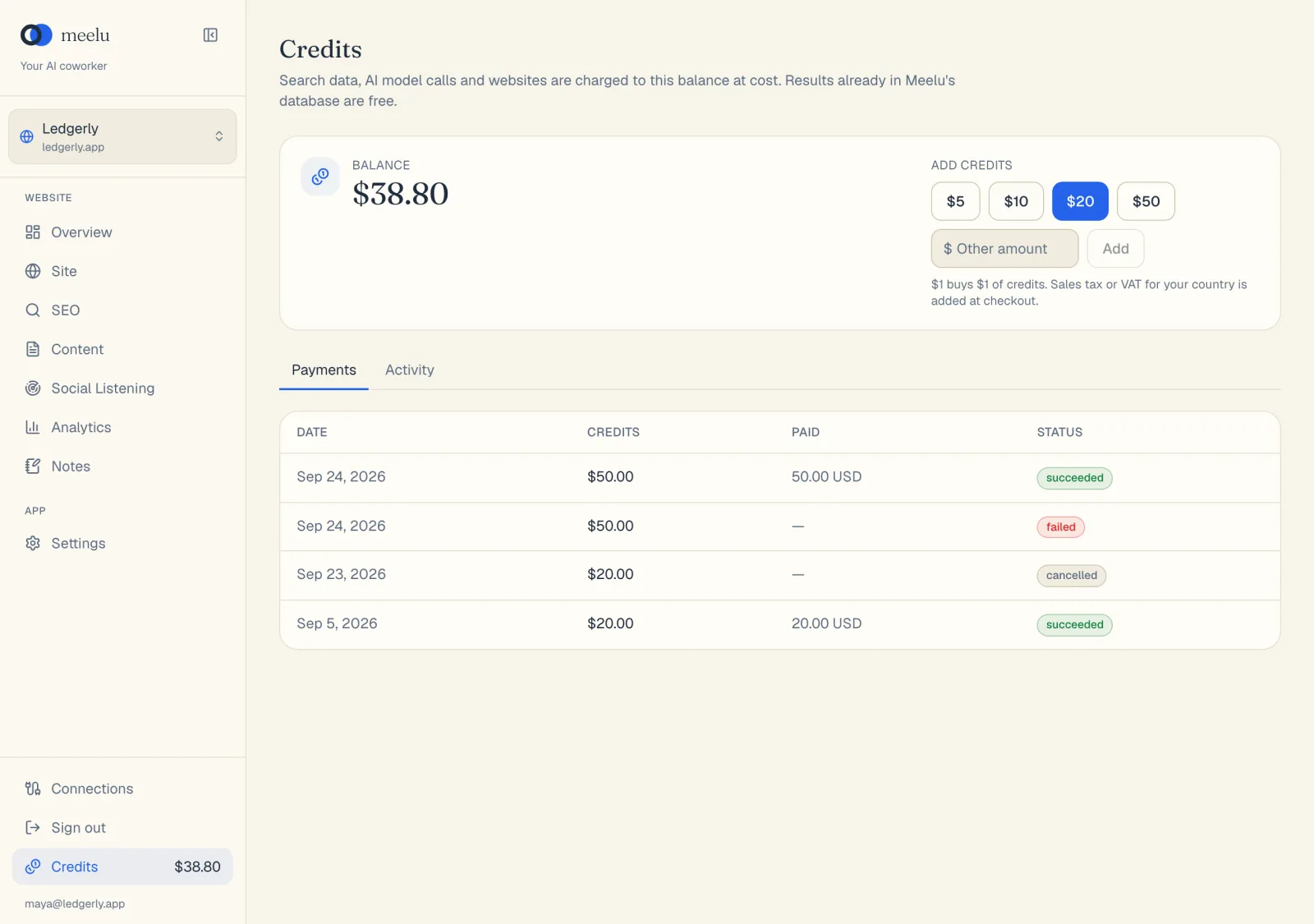
Click Credits at the bottom of the sidebar. The screen has your balance, the top-up buttons and two tabs of history.
Add credits
Pick an amount
Click $5, $10, $20 or $50. For another amount, type it in Other amount and click Add. You can add from $5 to $500 at a time.
Pay in your browser
A checkout page opens in your browser. Sales tax or VAT for your country is added there. Card details go to the payment provider and never reach Meelu.
Wait for the balance to update
Meelu shows Finish paying in your browser until the payment clears. Then it says how much was added. If the payment fails or you cancel, nothing is charged to your credits.
Payments tab
Every top-up you started, with its Date, the Credits it bought, what you Paid in your currency, and its Status: pending, succeeded, failed or cancelled.
Activity tab
Every change to your balance, with When, What, the Amount and the Balance after it. The What column shows the type and a short description:
| Type | What it is |
|---|---|
| Top-up | Credits you bought. |
| Free credits | Credits given to you by Meelu. |
| Usage | An outside service or AI model call, with what it was for. |
| Website | A website's daily fee, such as "example.com · one day". |
Use the Activity tab when you want to know where your credits went.
When credits run out
Two things can happen.
A paid step cannot run. Paid steps, such as AI model calls or keyword lookups, need a small minimum balance. If you are below it, a yellow Not enough credits banner appears at the top of the screen. Add credits, and the banner clears on its own within about 10 seconds, or click Check again.
A website is paused. If a website's next daily fee cannot be paid, the website is paused. It shows a paused tag in the website switcher, and a This website is paused banner appears when you open it.
While a website is paused:
- its data stays where it is
- calls to outside services for it stop
- once you add credits, it starts working again right away
A website that stays paused for 30 days is deleted, with all its data. Hover over the paused tag to see the exact date.
What each button does
| Button | Where | What it does |
|---|---|---|
| $5 / $10 / $20 / $50 | Credits screen | Opens a checkout for that amount. |
| Add | Credits screen | Opens a checkout for the amount you typed in Other amount. |
| Open checkout | Credits screen, while waiting | Opens the checkout page again, if you closed it. |
| Stop waiting | Credits screen, while waiting | Hides the waiting message. Your payment still goes through if you finish it. |
| Payments / Activity | Credits screen | Switches between top-ups and balance history. |
| Add credits | Billing banner | Opens the Credits screen. |
| Check again | Billing banner | Checks your balance now, instead of waiting for the next automatic check. |
For prices on the website, see meelu.tech/pricing.