Keyword clusters
Group searches that one page can win, see who searches them, and plan the page.
A keyword cluster is a group of searches that Google answers with the same pages. If "free invoice template" and "invoice template pdf" show the same results, one page can win both. So Meelu groups them and treats the group as one target.
Clusters are the heart of the SEO desk. You find them on the SEO home screen in the Keyword clusters table.
Why clusters, not single keywords
Writing one page per keyword leads to many thin pages that compete with each other (this is called cannibalisation). Writing one page per cluster means each page has a clear job. Each cluster has a main keyword. The page leads with the main keyword and also answers the rest of the cluster.
How clusters are built
You do not build clusters by hand. You ask Meelu, and it does the work in four steps:
- Collect searches from one of three sources (see below).
- Drop noise. Searches with almost no volume compared with their main topic are dropped.
- Drop off-topic searches. Meelu checks each search against what your website is about. It removes other companies' brands, jobs and salaries, piracy, other meanings of the same word, and subjects you do not cover.
- Group by need. Searches about the same core topic are grouped. A group is split again when Google would show different pages for its searches. These smaller groups are sometimes called sub-clusters. Several clusters can share one core keyword, but each one is its own page target.
When it finishes, Meelu tells you how many clusters came out and how many searches it dropped as noise or off-topic.
Searches that are already in a cluster are not clustered again. Clusters are built for the first country in your website's Markets setting.
The three sources
| Source | Where the searches come from |
|---|---|
| Build clusters for a topic (task card) | You name a topic. Meelu picks a few seed keywords, shows them to you, and builds clusters once you agree. |
| Cluster my Search Console queries (task card) | The searches Google already shows you for, most impressions first. |
| Your saved competitors (ask Meelu) | Keywords your saved competitors rank for that got your site no Search Console impressions in the last 28 days. Each keyword becomes its own cluster, and Meelu picks up to 100 of them at random. You need at least one saved competitor. |
Each new cluster's main keyword is also labelled with its intent and importance (see below).
Building clusters uses credits. See Credits.
The Keyword clusters table
| Column | Meaning |
|---|---|
| Main keyword | The cluster's lead search. Under it: how many keywords the cluster holds, and its core keyword. |
| Importance | hot, warm or cold (see below). |
| Intent | informational, navigational, commercial or transactional (see below). |
| Searches / mo | Estimated monthly searches for all the keywords in the cluster, in your market. |
| We rank | yes when Google already shows your site for one of the cluster's keywords. |
The table is ordered by monthly searches, most first. Type in Search a topic or phrase to find clusters. Use the filters to narrow the list:
- All: every cluster.
- We rank: clusters where your site already shows in Google.
- We don't rank: clusters where it does not yet.
Click a row to open the cluster.
Intent and importance
Meelu labels each cluster by its main keyword, so you can see who searches it.
Intent is what the searcher wants:
| Intent | The searcher |
|---|---|
| informational | Wants to learn something. |
| navigational | Wants one specific site or page. |
| commercial | Is comparing before choosing. |
| transactional | Wants to buy, sign up or book now. |
Importance is how close the searcher is to needing what your website offers:
| Importance | The searcher is |
|---|---|
| hot | Ready to act on what you offer. |
| warm | Comparing options you could serve. |
| cold | Learning about the topic. |
The cluster screen
Click a cluster to open it. The header shows how many keywords it has, its monthly searches, and its market and language.
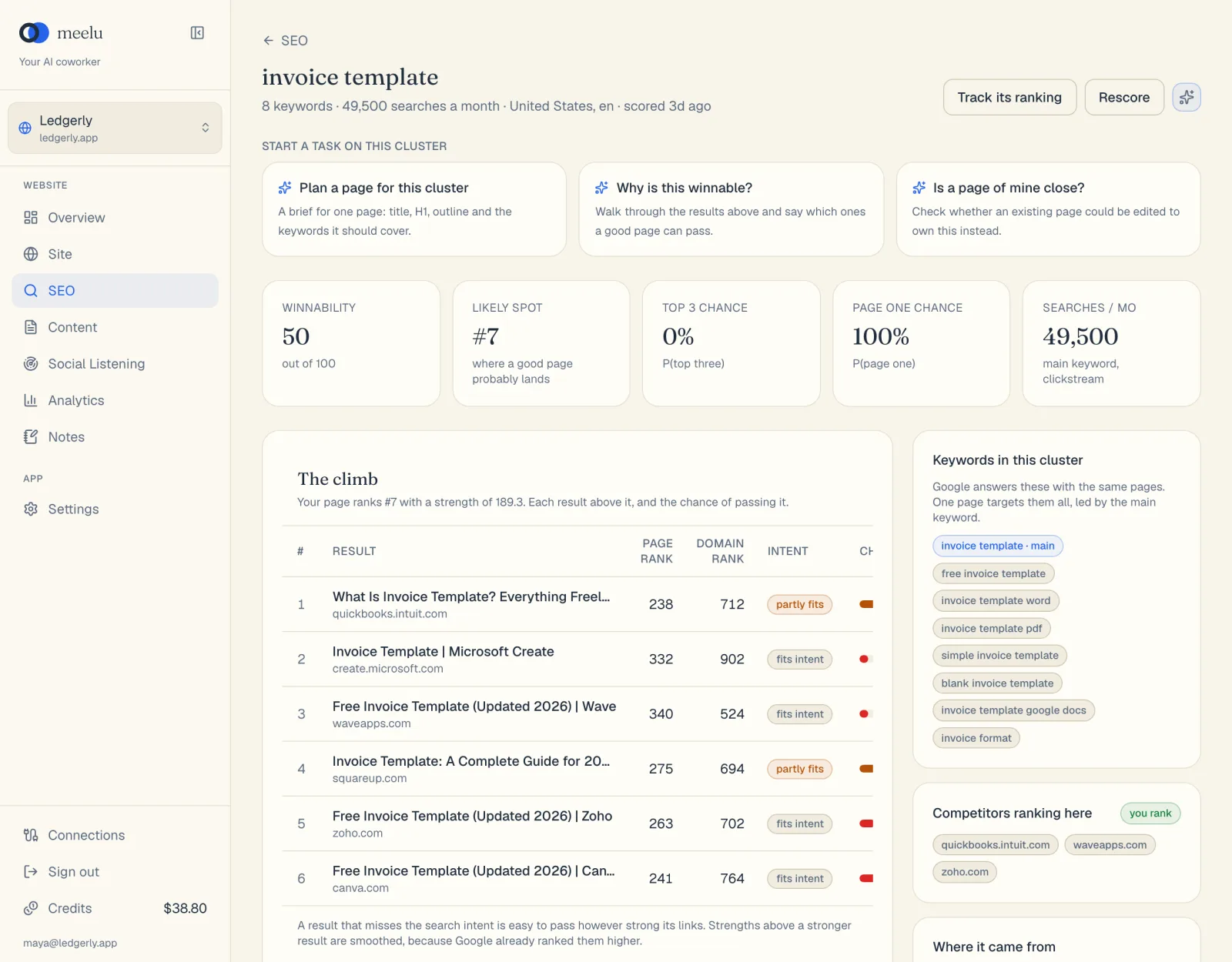
- 1Plan a page for this cluster
- 2Track this keyword
- 3Delete the cluster
Summary cards
| Card | Meaning |
|---|---|
| Searches / mo | Monthly searches for all the keywords in the cluster. |
| Keywords | How many searches the cluster holds. |
| Search Console | yes when Google already shows your site for one of its keywords. |
Side cards
- Who searches this shows the cluster's importance and intent, with what each means.
- Keywords in this cluster lists every search the page should answer. The main keyword is marked main.
- Where it came from shows the seed keywords and the core keyword.
What each button does
On the SEO home screen:
| Button | What it does |
|---|---|
| All / We rank / We don't rank | Filter the table. |
| Plan a page | Asks Meelu for a page brief for that cluster. Desktop app only. |
On a cluster screen:
| Button | What it does |
|---|---|
| Track this keyword | Starts tracking search demand for the main keyword in every market. Its demand and your Search Console position appear on Tracked keywords. Uses credits. |
| Ask Meelu (sparkle icon) | Opens a task about this cluster. Desktop app only. |
| Delete cluster | Removes the cluster after you confirm. |
Under Start a task on this cluster, three task cards are ready (desktop app only):
| Task card | What Meelu does |
|---|---|
| Plan a page for this cluster | Reads the results that rank now and writes a brief: title, H1, meta description, an outline and the keywords to cover. It also says which results are weakest and what the page needs to beat them. |
| Is a page of mine close? | Checks whether one of your existing pages could own this cluster, and whether editing it beats writing a new one. |
| Who holds this keyword? | Reads twelve months of Google results for the main keyword and names the domains that stayed in the top 10. It says where your site stood, and which of those domains are not saved as competitors yet. It asks before it saves any. |
Using clusters well
- Start with hot and warm clusters: those searchers are closest to what you offer.
- Before you write a new page, run Is a page of mine close?. Improving an existing page is often faster.
- Treat each cluster as one page. Do not split its keywords across several pages.
- The brief is a suggestion. You decide what to write. The Content desk can draft the page with you.