Tracked keywords
Follow how search demand moves for the keywords that matter to you, next to where you rank for them in Search Console.
Tracked keywords follows specific keywords you choose, whether you rank for them yet or not. For each one it shows twelve months of search demand (how many people search it each month) next to your position for it in Search Console.
Open it from the Tracked keywords card on the SEO home screen.
Start tracking
There are two ways to add keywords:
- From a cluster. Open a keyword cluster and click Track this keyword. This tracks the cluster's main keyword in every one of your markets.
- By asking Meelu. Click the Track my main keywords task card. Meelu tracks search volume for the main keyword of every cluster marked hot or warm. It tells you how many keywords that is before it starts.
Tracking uses credits, so Meelu always tells you the count first. Up to 50 keywords can be tracked in one go. See Credits.
When you track a keyword, Meelu fetches its monthly search volume for about the last twelve months, so you see the demand history straight away. Track it again later to add the newest months.
Where positions come from
Meelu does not check Google's results for tracked keywords. Your position is your own Search Console data: the average position for searchers in that market, weighted by impressions, for each month. It updates when your Search Console data syncs. See Search performance.
Reading the screen
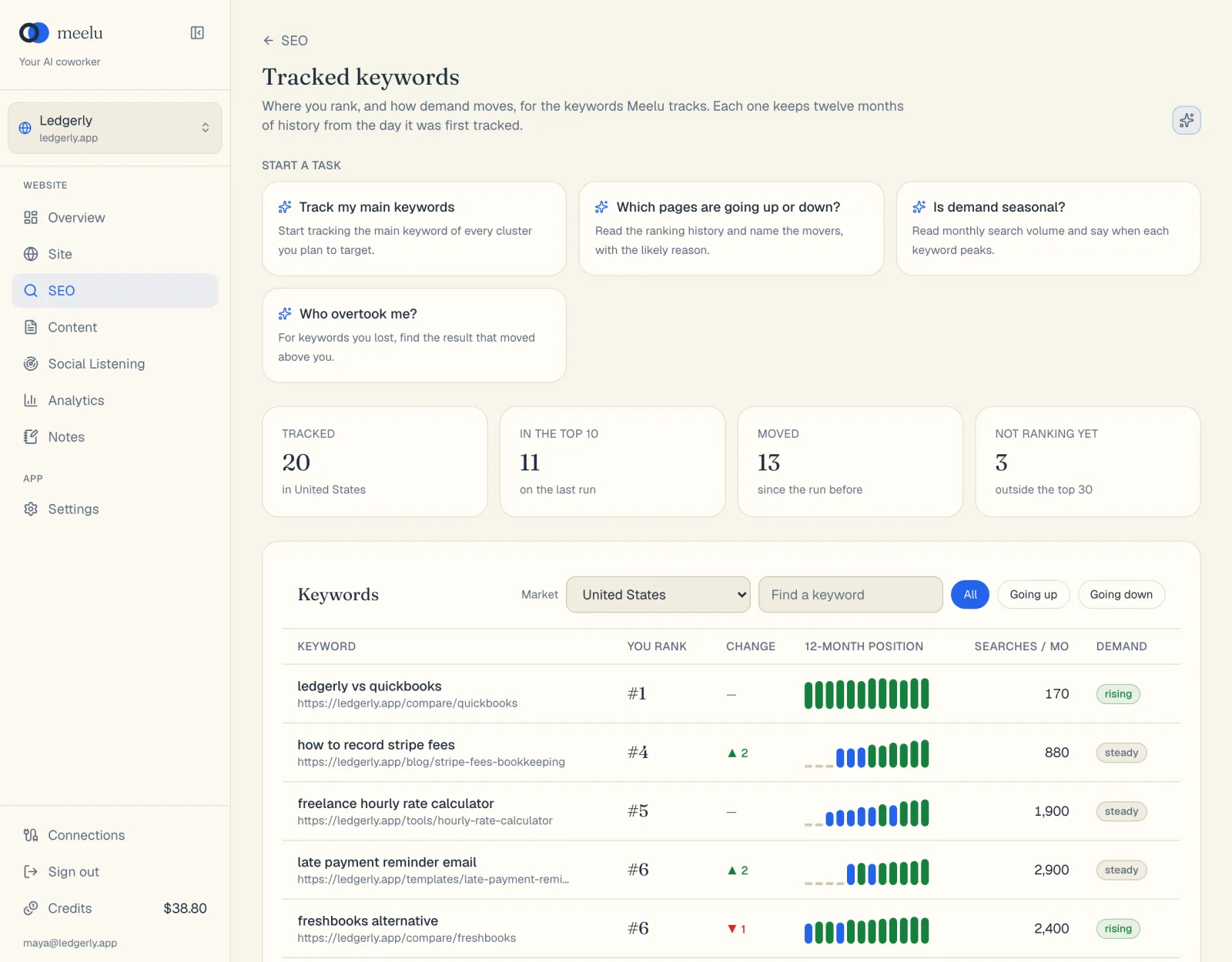
Summary cards
| Card | Meaning |
|---|---|
| Tracked | How many keywords you track in the chosen market. |
| In the top 10 | How many have an average position of 10 or better in the last month with data. |
| Moved | How many moved by a position or more since the month before. |
| Not ranking yet | How many have no Search Console impressions. |
The Keywords table
| Column | Meaning |
|---|---|
| Keyword | The tracked search. Under it: your page that ranks for it. |
| You rank | Your Search Console position in the last month with data, or no impressions. |
| Change | Positions gained (▲, green) or lost (▼, red) since the month before. |
| 12-month position | One bar per month. A taller bar means a better position. Green is the top 10, blue is below it, and a short grey bar is a month with no impressions. Hover a bar to see the month and position. |
| Searches / mo | Estimated monthly searches, for the latest month. |
| Demand | How search interest is moving (see below). |
Demand labels
Meelu labels demand once it has at least six months of search volume:
| Label | Meaning |
|---|---|
| seasonal | The busiest month has at least twice the searches of the quietest. Plan the page well before the peak. |
| rising | The last three months are up by a fifth or more on the three before. |
| falling | The last three months are down by a fifth or more. |
| steady | None of the above. |
What each button does
| Button | What it does |
|---|---|
| Market menu | Shows the keywords for another country you track. |
| Find a keyword | Filters the table by text. |
| All / Going up / Going down | Show every keyword, only gainers, or only losers. |
| Ask Meelu (sparkle icon) | Opens a task about your tracked keywords. Desktop app only. |
| Task cards under Start a task | Ready-made tasks, listed below. Desktop app only. |
| Task card | What Meelu does |
|---|---|
| Track my main keywords | Starts tracking the main keyword of every cluster marked hot or warm. |
| Which pages are going up or down? | Reads your Search Console position for the tracked keywords, month by month in each market, and names the pages that moved most, up and down. |
| Is demand seasonal? | Says which keywords are seasonal, when each peaks, and how far ahead a page should be ready. |
Tips
- Track the main keywords of the clusters you are actually working on, not every keyword you can think of.
- A drop of one or two places is normal. Look for steady moves over several months.
- Seasonal keywords need the page live and ranking before the peak, so check Is demand seasonal? early.